
Quote forms are essential part of every moving company’s website. If someone lands on a website with a form that immediately asks for a name, email, phone, moving date, origin and destination address, square footage, bedroom count – chances are, person is going to close the tab right away. Twenty seconds later they are filling out a competitor’s form instead, because it only asked two things first: moving from, and moving to.
That homeowner left because the form asked for too much, too soon. The quote form is the most important piece of a moving company’s website, the difference between a booked job and a drop in number of leads. We break down why long, single-step forms cost movers real leads, why splitting the same form into steps performs better, and show a proven template for a mover’s quote process.
The Lead Capture: Multi-Step vs. Single-Step Forms
Every moving company’s quote form has the same job: collect enough information to send back a usable estimate. But here is the tricky part: the more fields on the form, the fewer people finish filling it out. So you have to understand where the balance stands.
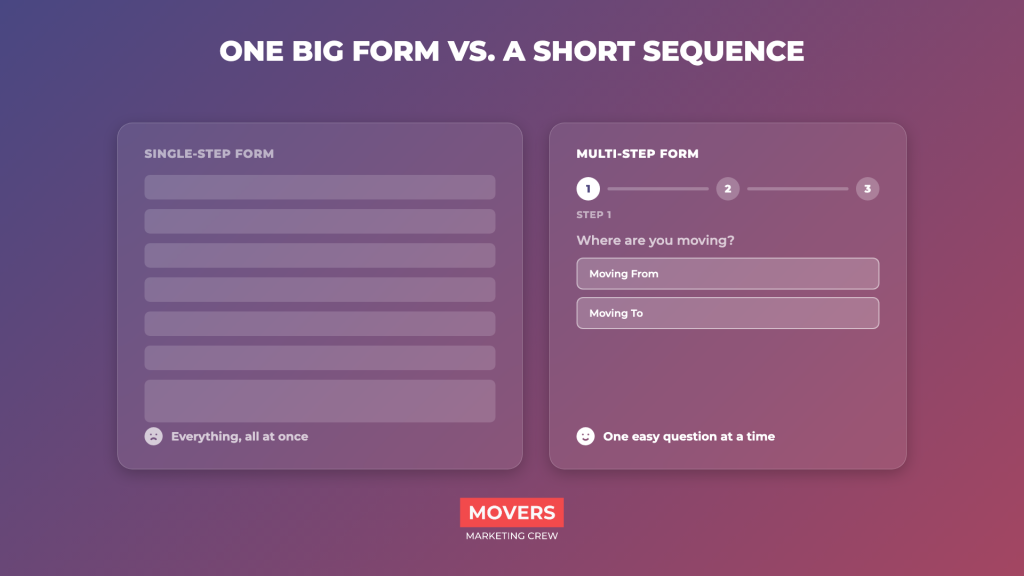
A single-step form puts every field on one page at once, name, phone, email, origin, destination, date, home size, inventory, all visible the moment the page loads. A multi-step form breaks that same set of questions into a short sequence of screens, asking for contact details only near the end. Both formats can collect identical information, the difference is entirely in how it’s requested, and that’s where most of exits happen.
Why Long Forms Are Killing Your Conversion Rates
Conversion rate is the percentage of visitors who take the action you want (for example, submitting the quote form). Every field is a small decision, and every decision is a chance to hesitate or give up.
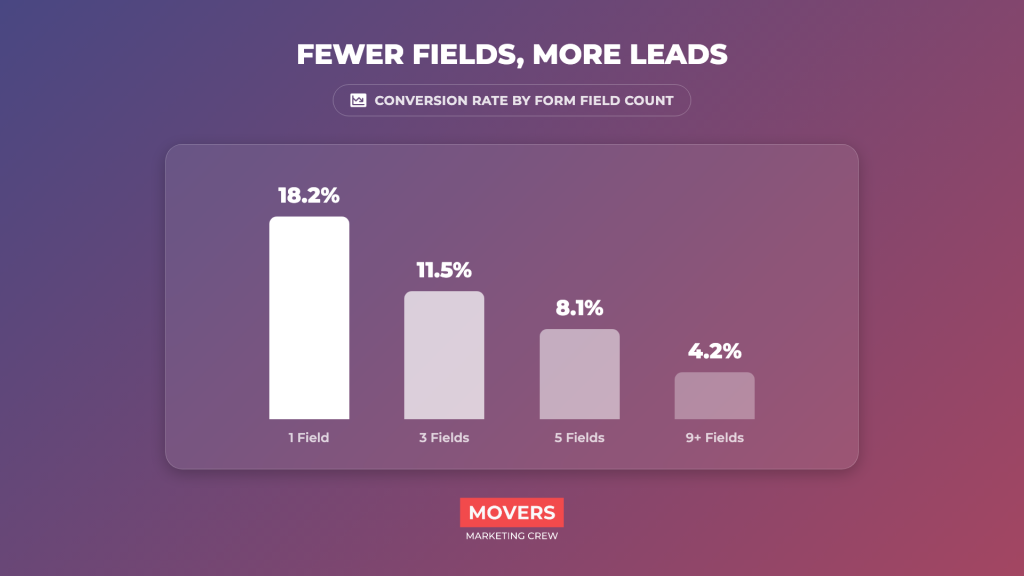
A December 2024 study by NP Digital found single-field forms converted at 18.2%, dropping to 4.2% for nine or more fields. The reason is clear: people don’t like to spend time with longer forms, especially when it comes to single field ones.
Micro-Commitments: Why Multi-Step Forms Win
Why do multi-step forms perform better? Because once someone takes a small, easy first step, they’re more likely to follow through on the next. This effect is why a form opening with “Moving from?” gets more completions than one that opens with a full page of fields.
By the time a visitor reaches the screen asking for name and phone, they’ve already invested a few clicks, and stopping now feels like wasted effort. 2026 benchmark research from Digital Applied shows multi-step quote request forms convert 12% higher on average than single-step forms collecting the same information. Again, the fields are the same, the only difference is how they are presented.
The Ultimate Multi-Step Quote Form Template for Movers
The goal isn’t to collect every detail up front, it’s to qualify the lead and start a real conversation. Acquire the basic facts to call back with a relevant estimate, not just an email address with no context. Everything else, square footage, exact inventory, stairs, can be gathered on the follow-up call, where your crew builds trust and closes the job. Best performing mover websites lean on short, multi step quote forms, simply because it simply works.
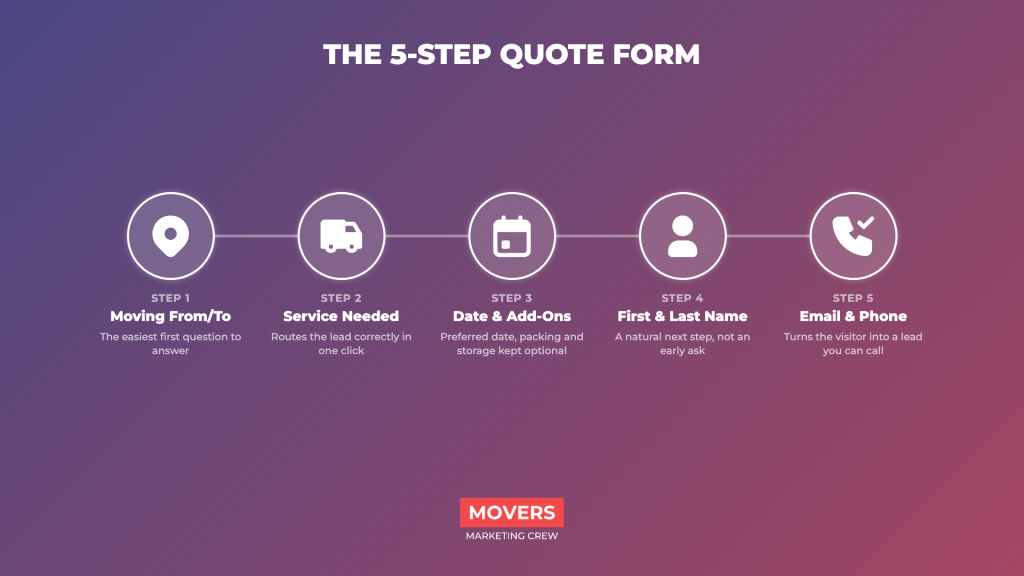
Step 1: Moving From / Moving To
Origin and destination city or zip code. The easiest possible first question, and it tells your team whether the move is local, long-distance, or outside your service area, so that you are prepared upfront, and able to give more precise estimate.
Step 2: Service Needed (Residential, Commercial, etc.)
Clickable options: residential, commercial, apartment, packing services, or junk removal. Routes the lead correctly in one click, and makes it more simple and likely to give that information.
Step 3: Preferred Date & Additional Services
A date picker plus optional checkboxes for packing, storage, or specialty items, kept optional so it doesn’t feel like a demand. Knowing the lead’s moving date upfront can save you a lot of time, focusing on jobs you can actually finish.
Step 4: First & Last Name
By now the visitor has answered three easy questions and is invested in finishing, so their name feels like a natural next step, not an early deal breaker.
Step 5: Email & Phone
The step that turns this into a lead your sales team can contact. Placing it last, after several small commitments, is why multi-step forms outperform ones that ask for contact info right away. They invested a lot of their time already, so at that point, they might as well give you their contact information.
How to Implement This Form on Your Website
Most mover websites already run a build that supports multi-step form plugins without a full rebuild. Gravity Forms, Typeform, and JotForm all offer multi-step layouts with progress bars, and most can be easily dropped into an existing “Request a Quote” page.
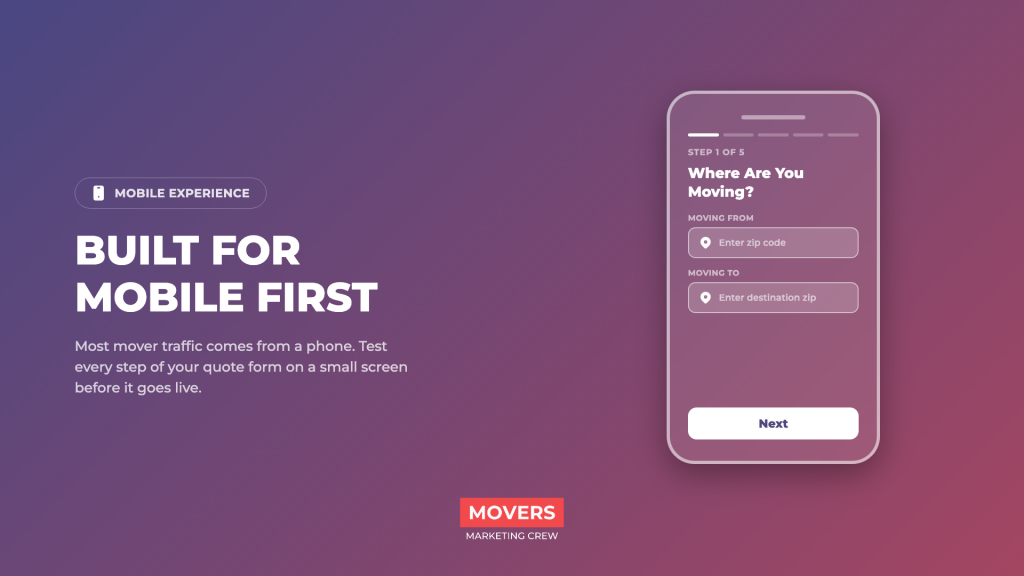
A few notes for movers making the switch: keep the total step count at three to five. Make the first step genuinely easy, two fields, one click, nothing that requires typing more than a zip code. Don’t ask for anything in the first two steps that could make a still-browsing visitor hesitate, like square footage or a full inventory list. And test the form on a phone before publishing, since most homeowner are browsing your website on mobile, and a form that looks clean on desktop can end up cramped on a small screen.
Conclusion
The form on a moving company’s website isn’t a formality tacked onto the homepage, it’s the mechanism that turns search traffic and ad spend into booked jobs. A long single-step form might feel more thorough, but every extra field is another chance for a busy homeowner to close the tab and call someone else. Breaking that form into a short sequence, easiest question first, keeps visitors moving forward instead of giving them a reason to stop. That’s the difference between a moving business that regularly attracts leads through website, and a business that misses opportunities each day.